
The Subject Outline serves as the learning and teaching agreement between the University and enrolled students.
It provides details about the subject, the subject coordinator, assessment items, teaching strategies and the specific conditions that must be met by students in order to obtain a passing grade in the subject.
CDAP to SOT assessment integration
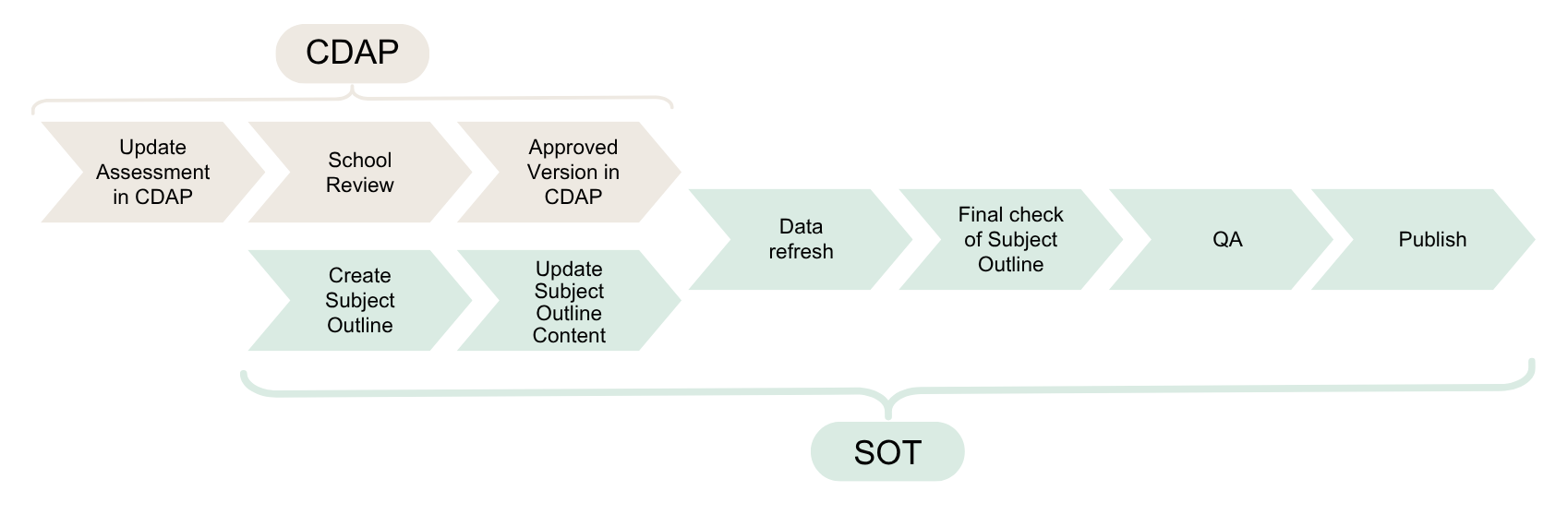
These short videos guide you through reviewing and updating assessment information in CDAP, and getting the approved information flowing correctly into the Subject Outline Tool (SOT).
Start with Video 1 for the overview, then open whichever videos below are relevant to what you need to do, you don't need to watch them in order. Together they cover the full process: reviewing your migrated assessment information in CDAP, through review and approval, to refreshing and checking your Subject Outline before QA.
Each video below includes a short description and a link to its written guide, open the ones you need.
How to find the correct subject version in CDAP before you start updating assessment information.
This video explains what is changing and the end-to-end process.
This video shows the main assessment fields and what academics need to check.
This video provides detail on task description, rationale, SLOs, rubric, and AI.
This video deals with the things most likely to cause confusion.
This video shows application to all offerings, duplicated assessment numbers, >100%.
This video covers comments, track changes and resolving reviewer requests.
Additional guide: 6a. Using Comments, Track Changes and Field Audit History in CDAP
This video covers approval, data refresh, verification and QA rule.
An Outline must be created for each offering of a subject.
The Subject Outline Tool (SOT) assists the process of creating a Subject Outline by automatically bringing in subject and institutional data, such as learning outcomes and academic policies, so that you do not need to replicate this information. You will however, need to provide details such as contact details and a study schedule. An Outline must be created for each cohort you are teaching.
Comprehensive help is available from the help site.
Quality assurance is undertaken on all academic activity at Charles Sturt, including Subject Outlines.
Subject Outlines must comply with Academic Senate Regulations, including the Course and Subject Information Procedure.
Effective quality assurance involves:
At Charles Sturt, we check the quality of our Subject Outlines using the Subject Outline Tool and the Subject Outline quality assurance checklist.
The Subject Outline tool has:
You can use this checklist as you prepare or quality assure your Subject Outline to make sure it:
The Subject Outline - Reviewer Guide (CDAP) supports School assessment reviewers to quality review assessment information in CDAP before it is approved and published in CDAP prior to finalising the Subject Outline in the Subject Outline Tool.
It provides a practical framework for checking that assessment is educationally sound, constructively aligned, policy compliant, internally consistent and clear for students, while also identifying key CDAP and operational requirements. The guide outlines what reviewers should check, how to identify and communicate issues requiring action, and how to confirm when the assessment review is complete.
As part of our university-wide work to strengthen the assurance of learning and support assessment integrity, we are introducing a new “Supervised Assessment: Yes/No” selection within the Subject Outline Tool.
For the full detail on this update including what you need to differently, please head to the webpage below.